Matches contents, not names
Two files are duplicates when their bytes are identical, whatever they are called. Uzi 808.wav and 808 [Spinz].wav can be the same sound, and this catches it.
 DESKTOP
Windows available now, macOS coming soon
DESKTOP
Windows available now, macOS coming soon
The same sample is sitting in four of your kits. This finds every copy and clears out the extras, without you having to open a single folder.
Free, runs on your own machine, and nothing about your library ever leaves it.
Version 0.3.0 · 148 MB · Free
Issues or questions: support@uforiya.com
The problem
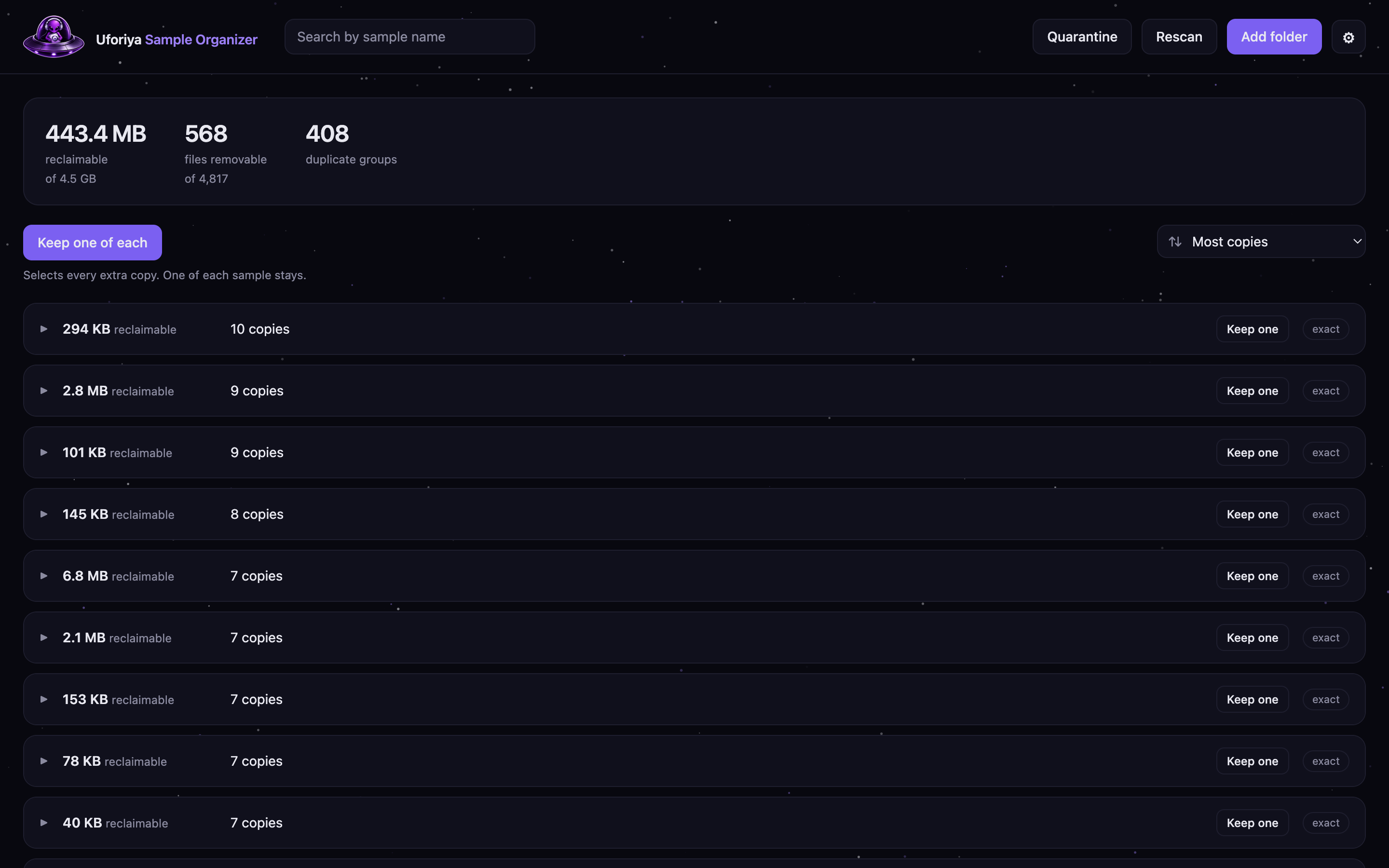
Buy enough drum kits and the same sounds start showing up in several of them, renamed every time. One kit turns out to contain another kit whole. You cannot find that by reading folder names, and no producer is going to listen through 5,000 one-shots to check.
Two files are duplicates when their bytes are identical, whatever they are called. Uzi 808.wav and 808 [Spinz].wav can be the same sound, and this catches it.
No similarity scoring and no thresholds. A "97% match" is the one thing you cannot act on when the decision is whether to delete a sound.
A full first scan of 4,800 samples takes about a second. After that it only looks at what changed, so reopening it costs nothing.
No account, no upload, no server. Your library is never sent anywhere, because there is nowhere for it to be sent.
Safety
Removing a sample you cannot get back is worse than keeping a duplicate forever, so the app is built to make that impossible by accident.
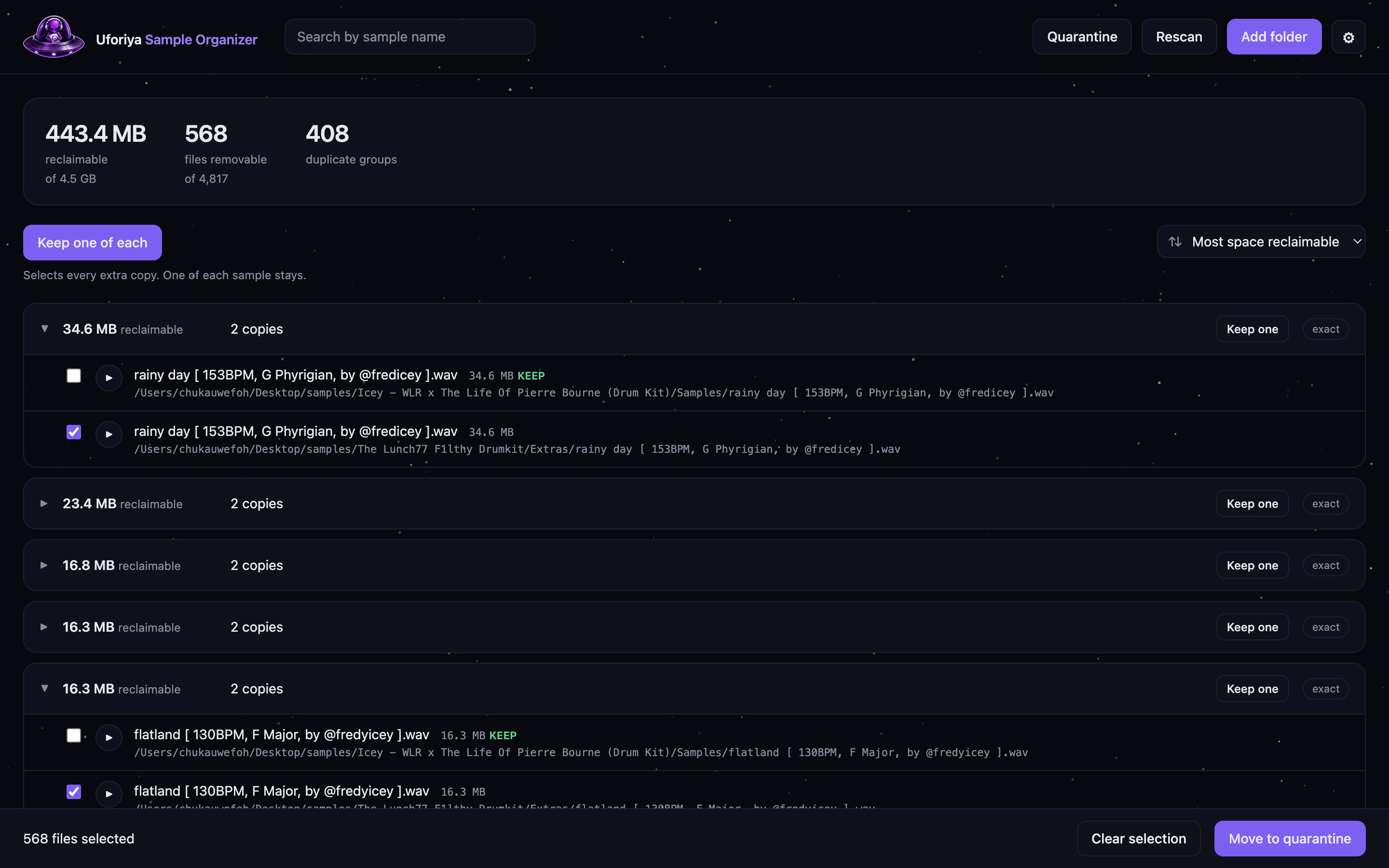
Any selection that would empty a group is refused outright, and the refusal names the file. That check runs in the engine, not the interface, so no click can get around it.
Every copy has a play button next to it. A byte-identical match is only reassuring once you have heard that both files are the sound you think they are.
Approved files move to a holding area on your disk. They have left your library, they are still on your machine, and one button puts every one of them back.
It only happens when you choose it, on a batch you name. No timer, no cleanup on launch, no side effect of anything else.
Inside the app

Questions
No. It has no account, no login and no connection to the Uforiya platform at all. It is a separate desktop app that happens to come from the same place.
Never. Every scan, every comparison and every file move happens on your own machine. The app works with your internet off.
Removals go to a holding area first, not to the bin, and one copy of every sample is always kept no matter what you select. Permanent deletion is a separate action on a batch you choose.
Identical file contents. Not similar sounds, not similar names — the same bytes. If two files differ at all, they are treated as different samples.
Yes. That screen appears for any Windows app without a code signing certificate, which costs a few hundred dollars a year and is not something a free tool has yet. It is not a virus scan result and it is not a warning about this app specifically. Click More info and then Run anyway. The source is public if you want to read it first.
Windows now. macOS is next, Linux after that.
Nothing.
support@uforiya.com. If it is about a specific sample or kit, the file path helps.